

Review · BANGKOK
Thailand eSIM (3 to 30 days, up to 60GB)
A working connection beats guessing. This Thailand eSIM is built for one job: getting you online fast for Bangkok—at local data rates—without hunting down a SIM counter. You get options from 3 to 30 days, and the setup is designed to be quick once you have your QR code and phone ready.
Two things I really like here. First, the speed is described as very good, and the plan is meant for everyday trip needs like navigation and planning. Second, you receive everything by email and can activate on the day you fly in, so you’re not stuck off-grid at the airport. The main thing to watch is that you must have an eSIM-compatible phone, and activation isn’t automatic—you still need to scan the QR code and enable roaming correctly.
In This Review
- Key things to know before you buy
- What this Thailand eSIM is actually for (and why it matters in Bangkok)
- Price and value: $5 per person sounds simple, but the details count
- Getting the eSIM by email: the easiest part, if you plan the timing
- Activation in Thailand: QR code, roaming, and the internet requirement
- Compatibility check: does your phone support eSIM?
- Using it around Bangkok: what data is good for (and what to expect after the cap)
- 3G fallback isn’t the end of the trip, but manage your expectations
- Customer service and support: what’s included and what isn’t
- The one weird detail you should double-check: Canadian provinces vs Thailand
- Should you book this Thailand eSIM for Bangkok?
- FAQ
- How long does this Thailand eSIM last?
- How much data do I get?
- What happens after I use the high-speed data?
- How do I activate the eSIM?
- Do I need internet access to set it up?
- What phones support eSIM for this plan?
- Will I get the eSIM in person after arrival?
- Is customer service included?
- What’s the cancellation rule?
Key things to know before you buy

- Email QR code delivery: You get the eSIM by email, with no physical pickup.
- 3 to 30 days options: Choose the duration that matches your trip length.
- Up to 60GB high-speed data: Once you hit the cap, speed drops to 3G.
- Activate on arrival day: You’re advised to set it up on the same day as departure, then activate once in Thailand.
- Internet is required to activate: You’ll need some connection to get the eSIM profile working.
- Print the QR code: The instructions recommend keeping a printed backup while traveling.
What this Thailand eSIM is actually for (and why it matters in Bangkok)
Think of this product as a digital plug-in for your phone. Instead of buying a physical SIM in Thailand, you install an eSIM profile and get mobile data right away—so you can use maps, translate, message friends, and find your way around without paying roaming rates that can quietly balloon.
In Bangkok, that matters more than you might expect. You’ll move between neighborhoods fast, and public transit + walking routes change depending on where you are that hour. A stable data connection helps you avoid backtracking and makes it easier to choose where to go next, even if your plans shift.
This plan also mentions that it works on 4G/5G where available. Even if you end up with 4G most of the time, that’s still the practical goal: keep data speeds high enough for map use and social messaging, not just basic web browsing.
Still deciding? Line this one up against a few Bangkok favourites first.
- Bangkok: Damnoen Saduak Market and Maeklong Railway Market
★ 4.5 · 26,723 reviews - The Old Siam: Damnoen Saduak and Maeklong Railway Market
★ 4.5 · 10,992 reviews - From Bangkok: Ayutthaya Temples Guided Tour with Lunch
★ 4.7 · 10,535 reviews
Price and value: $5 per person sounds simple, but the details count
At $5.00 per person, this eSIM is priced like an impulse-friendly add-on. The value comes from what you avoid: the time cost and hassle of airport SIM lines, plus the friction of figuring out activation steps with limited local language support.
That said, the value equation depends on how well your phone can handle eSIM activation and how your trip data usage matches the plan cap. The service includes mobile data for the duration you select, with high-speed capped at the mentioned amount, then switching to 3G afterward. If you plan lots of photos, heavy uploads, or video, you’ll want to manage usage so you’re not slowed down mid-trip.
So I’d frame the value like this: if you want reliable data for navigation and communication, this is usually a great deal. If you need nonstop high-speed streaming and photo uploads for the whole trip, you’ll want to double-check the data cap strategy first.
Getting the eSIM by email: the easiest part, if you plan the timing
The provider sends the eSIM details to your email. There’s no meetup, no physical exchange, no “pick it up here.” You’ll scan the QR code to activate the eSIM profile.
Here’s the practical timing tip I’d follow: order soon enough that the email arrives before you leave. One of the biggest frustrations that shows up in the feedback is not the technology, but timing—if you wait too late, you may not receive the QR/eSIM when you need it. So set a personal rule: buy at least a day ahead of departure so you have time to test setup before you land.
Also, the instructions recommend setting up your eSIM on the same day as your departure date. That doesn’t mean you’ll necessarily have it fully active in Thailand at that moment, but it helps you avoid last-minute chaos.
Activation in Thailand: QR code, roaming, and the internet requirement
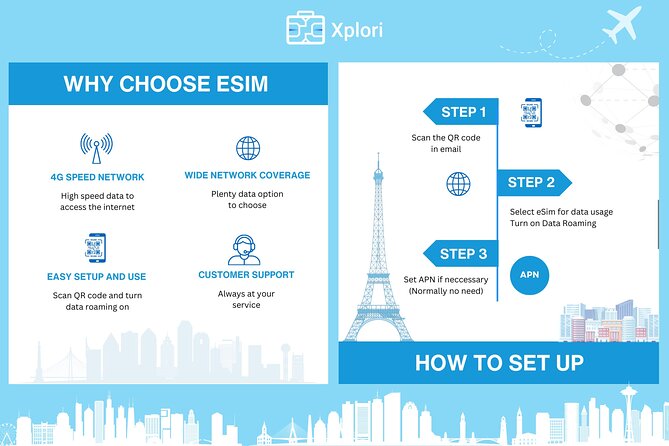
Activation is the real step. The instructions are clear: scan the QR code to activate the eSIM profile, then enable data roaming when you’re in Thailand.
Two details matter a lot for not getting stuck:
- You need internet access to activate. If your phone requires online steps for the eSIM profile, you’ll want a temporary connection available (for example, airport Wi-Fi or another data source) long enough to complete activation.
- Enable roaming. This is a common “why is my data not working” moment. The eSIM may be installed, but if roaming isn’t enabled, the data may not connect as expected.
They also recommend printing the QR code and carrying it with you as a precaution. That’s old-school advice, but it’s smart. Phones die, screens break, and email access can get messy at the airport.





Compatibility check: does your phone support eSIM?
Before you buy, verify compatibility. The details give examples of supported phones, including:
- iPhone XS and later
- Pixel 3 and later
- Samsung S20/ S21/ Fold
If your phone isn’t in that category (or you’re unsure), the instructions say to contact the provider in advance. This is worth doing because the whole product depends on eSIM support. No eSIM support means no installation step, and you’ll lose the time advantage this eSIM is supposed to give you.
Using it around Bangkok: what data is good for (and what to expect after the cap)
Once activated, the plan is designed for general travel tasks: finding your way, making trip plans, and staying connected with friends and family. The “4G/5G where available” part is there because it affects how quickly you can load maps and messaging without constant waiting.
The speed is capped. After you use through the high-speed allowance, the plan switches to 3G. That’s not useless, but it changes the experience. You might still browse and message, but heavier tasks (large photo uploads, long video watching, or constant app syncing) can slow down.
Based on feedback, the connection performance is generally praised, especially for day-to-day use. One note in the details is that apps like WhatsApp and Facebook were reported as working well, while Google Photos uploads were not working as expected. That doesn’t automatically mean the eSIM is “bad,” but it does suggest you may want a backup plan for photo uploads—like using Wi-Fi when possible or avoiding background uploads during the slow phase.
3G fallback isn’t the end of the trip, but manage your expectations

The switch to 3G after the cap is the biggest “hidden variable” in any data plan like this. If your trip is mostly maps, messaging, and light browsing, the 3G phase can still be workable. If your trip includes lots of photo/video uploading, the capped speed may become noticeable.
A simple strategy:
- Use data freely for navigation and communication.
- Save big uploads for when you have Wi-Fi (hotel, cafe, or airport).
- If you rely on one photo service to back up everything automatically, consider setting it to sync only on Wi-Fi during the trip.
This kind of management keeps your experience smooth without you having to monitor usage every hour.
Customer service and support: what’s included and what isn’t
The plan includes remote customer service, plus delivery of the eSIM by email. Since there’s no pickup and no physical service desk, support is likely to happen through digital channels.
What’s not included is a physical product exchange or any in-person help. If you’re the type who likes hands-on setup at a counter, you may find this more stressful than a traditional SIM purchase. But if you’re comfortable following step-by-step phone instructions, the remote approach is usually fine.
The one weird detail you should double-check: Canadian provinces vs Thailand
One line in the description says the data plan covers all Canadian provinces. That doesn’t match the Bangkok/Thailand focus. I can’t assume what that means, but I would treat it as a red flag to clarify before you rely on the eSIM.
If you’re booking for Thailand data, contact the provider and confirm the coverage and activation region. Better one quick confirmation now than a surprise later.
Should you book this Thailand eSIM for Bangkok?
I’d book it if you want:
- Fast, email-first setup
- A no-counter, no-airport-line way to get online
- A plan that’s meant for navigation and communication
- Reasonable value at $5 for the selected duration (3 to 30 days)
I would hesitate if:
- Your phone might not support eSIM
- You’re leaving immediately and can’t wait for email delivery in advance
- You need high-speed data for large uploads constantly (especially after the cap drops to 3G)
- You rely heavily on Google Photos or similar services without Wi-Fi backups
If you do buy, your “smooth trip” checklist is simple: confirm eSIM compatibility, order early enough to receive the QR code, print a backup, and plan for activation with some internet access.
FAQ
How long does this Thailand eSIM last?
You can choose a plan duration from 3 to 30 days, based on your trip length.
How much data do I get?
The plan is listed as up to 60GB of data (high-speed allowance) for the duration you select. After the cap, speed switches to 3G.
What happens after I use the high-speed data?
High-speed data is capped at the amount shown in the plan. After that, data speed switches to 3G.
How do I activate the eSIM?
You scan the QR code after the eSIM profile is delivered to your email. Then you enable the data plan and data roaming when in Thailand.
Do I need internet access to set it up?
Yes. The instructions note that internet access is required to activate the eSIM.
What phones support eSIM for this plan?
The details list iPhone XS and later, Pixel 3 and later, and Samsung S20/ S21/ Fold as examples. If you’re unsure, you should contact the provider in advance.
Will I get the eSIM in person after arrival?
No. This is a purely digital product, delivered by email. There is no pickup or meetup.
Is customer service included?
Yes. Remote customer service is included.
What’s the cancellation rule?
You can cancel for a full refund up to 24 hours before the experience start time. Free cancellation is available under that window.